

No-Code, No-Cost: Top Free Web AR Platforms to Try Today
AR Is No Longer Just for Big Budgets
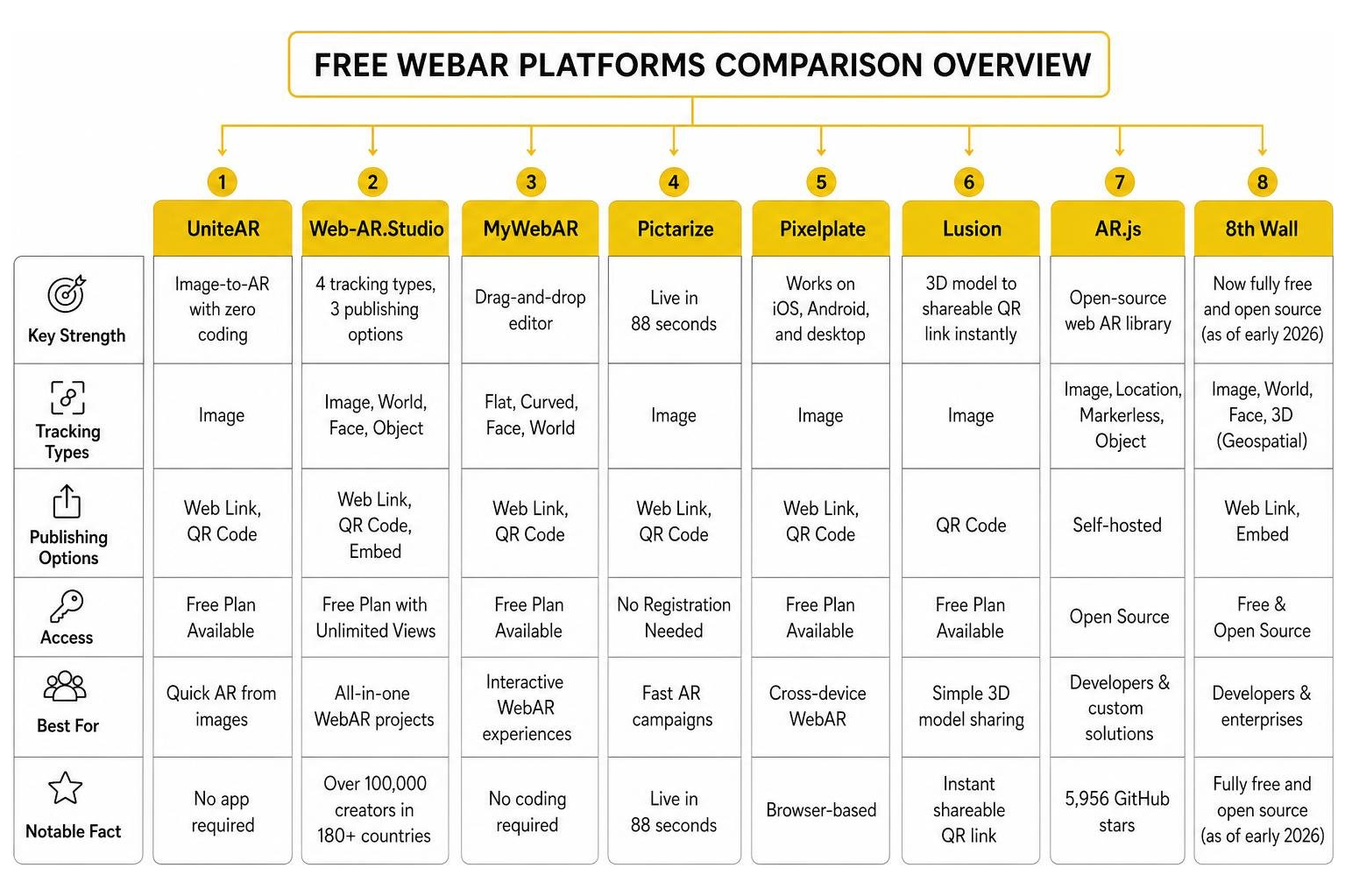
The best free tools to create an augmented reality website free of any technical barriers — right now, in 2026 — include:
- UniteAR – image-to-AR with zero coding, no app required
- Web-AR.Studio – 4 tracking types, 3 publishing options, free unlimited views
- MyWebAR – drag-and-drop editor with flat, curved, face, and world tracking
- Pictarize – live in 88 seconds, no registration needed
- Pixelplate – browser-based, works on iOS, Android, and desktop
- Lusion – upload a 3D model, get a shareable QR link instantly
- AR.js – open-source, self-hosted, 5,956 GitHub stars
- 8th Wall – now fully free and open source (as of early 2026)
Not long ago, building an AR experience meant hiring a development team, buying expensive software, and asking your audience to download a dedicated app. Most people hit a wall before they even started.
That’s changed dramatically.
Today, platforms like Web-AR.Studio have over 100,000 creators across 180+ countries building professional AR projects — many of them without writing a single line of code. AR.js, the open-source web AR library, has nearly 6,000 GitHub stars and keeps growing. And in early 2026, 8th Wall — once a premium paid platform — went fully free and open source.
The barrier to entry is essentially gone. What used to cost thousands of dollars can now be done in minutes, from a browser, for free.
I’m Samir ElKamouny, a marketing strategist and entrepreneur who has helped brands use emerging technologies — including augmented reality website free tools — to build deeper audience engagement and drive real revenue. In this guide, I’ll walk you through the best free WebAR platforms available today so you can find the right fit for your goals fast.
Discover more about augmented reality website free:
How to Build an Augmented Reality Website Free of Charge

Building a browser-based augmented reality experience is surprisingly straightforward. WebAR leverages open web standards like WebXR and WebGL2 to run immersive 3D and media layers directly inside mobile browsers like iOS Safari and Android Chrome. This eliminates the “app download barrier” entirely, allowing your visitors to experience AR with a simple QR code scan or link click.
If you are worried that you do not have the technical chops to build this, take a deep breath. You do not need a computer science degree. By using an intuitive How to Create Augmented Reality Online Free Without Losing Your Mind workflow, anyone can upload a 3D asset, map it to a physical trigger, and host it on the web in under ten minutes.
Top No-Code Platforms for an Augmented Reality Website Free Experience
To make your life easier, we have rounded up the top free no-code platforms that let you build WebAR experiences directly in your browser. These editors feature drag-and-drop interfaces, cloud hosting, and instant publishing. For a complete look at how to get started, check out our guide on how No Coding Required: Create Stunning AR Experiences Today.
- UniteAR: Trusted by over 50,000 users, Transform any image into a captivating AR experience—no … is a zero-coding platform that specializes in image-to-AR transformations. It is incredibly popular for product packaging, art, and education. The platform has already tracked over 94,990 AR App users and 122,392 AR views, making it a highly reliable option for creators.
- Web-AR.Studio: This is a powerhouse for universal AR creation. Web-AR.Studio | Universal platform for creating AR & WebAR … supports more than 100,000 creators and has hosted over 300,000 projects worldwide. It offers 4 distinct editor types, 4 tracking algorithms, and lets you embed AR displays directly into your website in just a few clicks.
- MyWebAR by DEVAR: If you want a highly versatile all-in-one platform, MyWebAR by DEVAR – create augmented reality on web … is an exceptional choice. It features an intuitive drag-and-drop editor with templates designed for marketing, education, and retail. It supports flat image tracking, curved tracking (perfect for bottles and cans), face filters, and world tracking.
- Pictarize: If you are in a rush, Pictarize claims you can go from launching the studio to a published web experience in just 88 seconds. It requires no registration to try, focuses heavily on high-quality image tracking, and automatically falls back to a non-AR mode for older devices.
- Pixelplate: Operating on the motto “Where Physical Meets Digital,” Pixelplate is 100% free to get started. It offers a zero-code editor, flat image tracking, and built-in web hosting that works seamlessly across iOS, Android, and desktop browsers.
- Lusion: Perfect for showcasing products, Lusion allows you to upload GLB, USD, or OBJ files, configure custom lighting and hotspots, and share them instantly. They optimize all models to fit under a strict 12MB limit to ensure smooth 60fps performance on mobile devices.
Key Features of an Augmented Reality Website Free Builder
When choosing an augmented reality website free builder, you should look for specific tracking capabilities and file format support to match your project needs. Different platforms excel at different tracking methods, which we detail in our guide on AR Content Creation.
- Image Tracking: Anchors digital content (like a 3D model or video) to a flat physical target, such as a business card, book cover, or poster.
- Surface Tracking (World Tracking/SLAM): Detects flat surfaces like floors, tables, or ground planes, allowing users to place life-sized 3D models in their physical space.
- Face Filters & Try-Ons: Tracks facial landmarks to overlay digital makeup, glasses, hats, or jewelry.
- Curved Image Tracking: Specialized tracking for cylindrical objects like cups, bottles, and cans.
- Supported File Formats: Look for platforms that support standard 3D files (GLB, GLTF, OBJ) and multimedia formats (MP4, WebM for transparent video overlays, and MP3 for audio).
Step-by-Step Guide to Launching Your First WebAR Project
Ready to build? Follow this simple workflow to launch your very first WebAR experience. For an even deeper dive, read our quick tutorial on How to Build Your First AR App in Minutes.
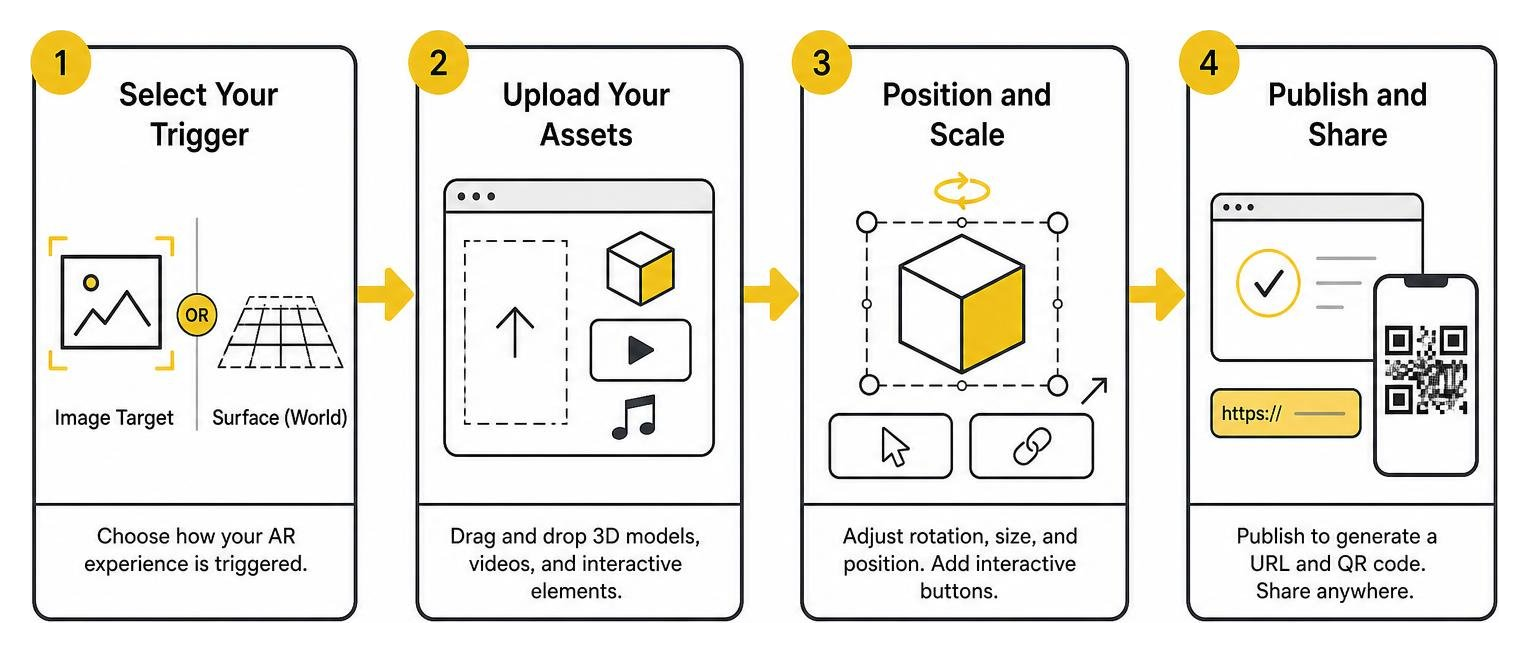
- Select Your Trigger: Choose whether your AR experience will be triggered by an image target (like a flyer) or placed on a flat surface in the real world.
- Upload Your Assets: Drag and drop your 3D models (keep them under 12MB for fast mobile loading), videos, or interactive buttons into the platform’s visual editor.
- Position and Scale: Adjust the rotation, size, and position of your assets relative to the trigger or ground plane. Add interactive “Buy Now” or “Learn More” buttons to drive conversions.
- Publish and Share: Click publish to generate a unique URL and an automatic QR code. You can print this QR code on physical materials or embed the experience directly onto your website using a simple iframe code snippet.
Comparing Free WebAR Tools and Open-Source Frameworks
For creators who want more customization or want to host their own projects without platform limitations, open-source frameworks are a powerful alternative to no-code builders.
| Feature / Platform | No-Code WebAR Builders (MyWebAR, Web-AR.Studio) | Open-Source Frameworks (AR.js, 8th Wall Desktop) |
|---|---|---|
| Coding Required | None (Drag-and-drop visual editors) | HTML, JavaScript, CSS |
| Hosting | Hosted by the platform (often with watermarks/limits) | Self-hosted (100% control, no platform fees) |
| Tracking Types | Image, Surface, Face, Curved | Image, Location-based, Marker (Hiro), Face |
| Setup Time | Minutes | Hours (requires setting up a local server) |
| Customization | Limited to editor features and templates | Unlimited (integrate with Three.js, A-Frame, Babylon.js) |
If you have web development experience, AR-js-org/AR.js is an incredible, lightweight framework that lets you build marker-based, image-tracking, and location-based AR directly in HTML. Because it is completely free and open-source, you avoid the view limits or premium subscriptions associated with SaaS platforms.
Similarly, the now open-source 8th Wall Desktop engine offers advanced capabilities for developers looking to build professional-grade WebAR. To understand the full spectrum of development paths, explore The Ultimate A-Z Guide to AR Development.
The Future of Web-Based Augmented Reality

The future of WebAR is incredibly exciting. With Google’s ARCore and its advanced APIs, including the Geospatial API and Scene Semantics, web-based AR is moving beyond simple tabletop models to world-scale digital overlays. Developers can now build experiences that interact realistically with city streets, buildings, and local terrain geometry.
To stay ahead of these technical trends, check out The Ultimate AR Core Download Map for Developers and our guide on From Zero to AR Hero: Developing Augmented Reality for Android.
Choosing the Right Free AR Tool for Your Use Case
To get the best results, we recommend matching your platform to your specific project goals:
- For Public Art & Murals: Use Atelieno or AR.js. They are built to make public art interactive, allowing you to anchor video overlays or 3D animations to physical paintings without forcing visitors to download an app.
- For E-Commerce & Retail: Use MyWebAR or Lusion. Their support for photorealistic 3D models and interactive buttons makes them perfect for product previews and virtual try-ons.
- For Quick Marketing Campaigns: Use Web-AR.Studio or Pictarize. Their fast publishing pipelines and built-in analytics help you launch campaigns in minutes and track user engagement.
- For Education & Classrooms: Use UniteAR or Pixelplate. Their simple, zero-coding interfaces make it easy for teachers and students to bring textbook illustrations to life in 3D.
For a deeper dive into designing these interactions, refer to AR Experience Design: What It’s Like and How to Get Started.
Scaling Beyond Free WebAR with Advanced Solutions
While free augmented reality website free platforms are fantastic for prototyping, education, and small-scale campaigns, they often come with limitations. You may run into strict asset file size caps, view limits, platform watermarks, or a lack of advanced developer features.
If you want to build highly customized, enterprise-grade AR experiences, you need a development workflow that scales. For developers looking to write custom code without managing complex servers, tools like the WebAR SDK 💻 Most advanced Augmented Reality Dev Tools offer cloud hosting, online code editors, and deep integration with popular 3D libraries.
To truly set your brand apart, we can help you scale your digital presence. At Avanti3, we integrate cutting-edge Web3 technologies — including NFTs, blockchain, AR/VR, and AI — to provide customizable engagement tools and fintech solutions. We empower creators and brands to build unique digital experiences, interactive rewards systems, and powerful community-building opportunities that redefine digital engagement and fan monetization.
Ready to take your AR strategy to the next level? Read our Ultimate AR Creation Guide and explore our custom AR Marketing Solutions to see how we can build the future of your brand together.