

The Ultimate Web-AR Studio Guide: No-Code AR Platforms Compared
Why Web-AR Studio Is the No-Code AR Platform to Know in 2026
If you’re evaluating a web-ar studio to build browser-based augmented reality without writing a single line of code, here’s a quick answer:
Best no-code WebAR platforms in 2026:
| Platform | Free Tier | No-Code | Key Strength |
|---|---|---|---|
| Web-AR.Studio | Yes, unlimited views | Yes | 4 editor types, 4 tracking modes |
| MyWebAR | 14-day trial | Yes | Curved image + object tracking |
| Kivicube | Yes | Yes | Face filters, fast setup |
| AR.js Studio | Yes (open source) | Yes | Marker + location AR |
| ARLOOPA Studio | Yes | Yes | QR/link-based campaigns |
| 8th Wall | Now free + open source | Partial | Three.js/A-Frame integration |
The barrier to creating professional AR has dropped dramatically. Over 120,000 creators across 180 countries have already built more than 400,000 AR projects — generating over 15 million views — using browser-based tools that require no coding and no 3D design skills.
That shift is real, and it’s accelerating.
Brands, educators, and independent creators are replacing expensive development cycles with drag-and-drop editors that publish directly to the web. No app download required. No developer team on payroll.
But with more platforms entering the space, choosing the right one matters. Each tool has different strengths, tracking capabilities, pricing models, and publishing options. The wrong choice can mean hitting a wall just when your project needs to scale.
This guide breaks down exactly how the leading platforms compare — so you can pick the right fit for your goals.
I’m Samir ElKamouny, an entrepreneur and marketing strategist who has helped scale businesses across digital channels, including emerging technologies like web-ar studio tools that open new doors for brand engagement and audience monetization. My work sits at the intersection of innovation and execution — which makes this comparison especially relevant for creators and brands ready to turn AR from a novelty into a real growth lever.
Basic web-ar studio glossary:
- augmented reality website free
- best augmented reality development tools
- augmented reality software for beginners
Comparing Web-AR Studio with Alternative No-Code Frameworks
To choose the best path forward, we need to understand how the market has evolved. The augmented reality platforms landscape in 2026 is divided between pure-play commercial builders, open-source frameworks, and hybrid models.
A massive shift occurred in February 2026 when 8th Wall retired its hosted subscription model and transitioned to a free, open-source framework. This disrupted the industry, forcing other creators to choose between completely open-source flexibility and the convenience of hosted, no-code visual editors.
Web-AR.Studio (founded in 2019 with a dedicated team of 5 across the US, Georgia, and Serbia) positions itself uniquely: it offers completely free core features with unlimited project views. This is a game-changer for creators who want to build without worrying about sudden cost spikes when their campaigns go viral.
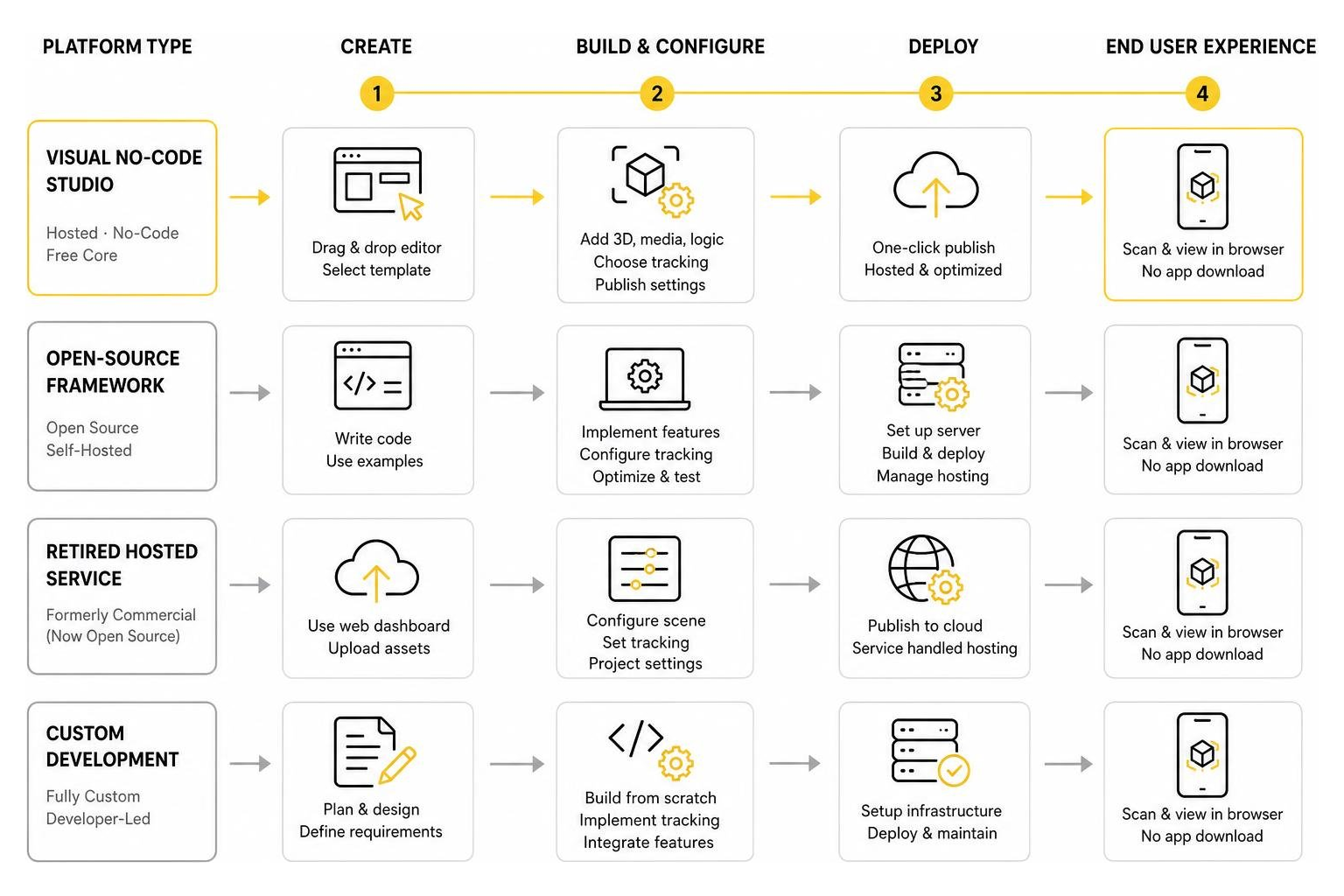
When we look for a no code, no cost: top free web ar platforms to try today, we must weigh the development effort against the target user experience. While open-source binaries offer unlimited freedom, they require hosting setups. Web-AR.Studio bridges this gap by offering hosted, visual-first creation entirely for free.
Core Features and Tracking Technologies of Web-AR Studio
At the heart of any web-ar studio are its recognition algorithms. How well does the camera understand the physical world? Web-AR.Studio handles this via four primary tracking modes that power its web-based AR solution:
- Photo & Image Tracking: Projects digital layers onto flat images, posters, or business cards.
- QR Tracking: Uses QR codes as high-contrast anchors for instant, stable positioning.
- Surface Tracking (World AR): Detects horizontal or vertical planes to place 3D models directly in your room.
- Location Tracking: Anchors interactive digital experiences to specific GPS coordinates.
Beyond these, the platform supports face tracking for custom filters and immersive 360-degree environment portals. Because it is a cloud-based AR system, users can interact instantly through standard mobile browsers (like Chrome and Safari) on iOS and Android. There is no friction, no app download, and no barrier to entry.

Understanding the Four Editor Tiers in Web-AR Studio
Web-AR.Studio accommodates different skill levels by offering four distinct editor tiers. Understanding which one to use will save you hours of frustration:
- WAS Lite: The quickest entry point. If you want to link a 3D model to a QR code in three clicks, this is where you start.
- WAS Design Studio: The flagship visual editor. It allows you to build complex scenes, set up animations, and establish interactive scripting between elements.
- WAS Universal: Optimized for cross-device compatibility, ensuring your assets render flawlessly across mismatched browser engines.
- WAS 3D Configurator: Specifically designed for e-commerce, allowing users to swap colors, textures, and components of a product in real time.
If you are learning how to build your first AR app in minutes or figuring out how to create augmented reality online free without losing your mind, we highly recommend starting with WAS Lite.
Best Practice Tip: Always optimize your 3D assets before importing them into the editor. We recommend using Blender to decimate high-poly meshes and compress textures to under 5MB. Smaller file sizes mean faster loading times in mobile browsers, which keeps your bounce rates low!

Open-Source Innovation with Open-WebAR-SDK
For developers who want to bypass visual interfaces entirely, Web-AR.Studio offers the open-webar-sdk (also known as ARSY). This open-source repository on GitHub provides a lightweight, code-first alternative to libraries like MindAR.
With a few releases under its belt in 2026 (currently on v1.0.22), it features a handy command-line interface (CLI) for rapid scaffolding. By running a simple command:
npx create-webar-app my-ar --image
Developers can instantly spin up localized templates for image, face, QR, or WebXR tracking under the permissive Apache 2.0 license. It supports multi-tracking scenarios for up to 100 images and QR codes simultaneously, making it a robust option for custom web builds.
No-Code Alternatives for Browser-Based AR
If you want to look outside of Web-AR.Studio, several strong alternatives offer no coding required: create stunning AR experiences today:
- MyWebAR (by DEVAR): An excellent choice for advanced tracking. It supports curved image tracking (great for bottles and cans), face filters, and object tracking. It features a drag-and-drop editor and a PRO mode that accepts custom Three.js code, though its free access is limited to a 14-day trial.
- Kivicube: Highly popular for interactive face filters and quick marketing activations. It features visual scripting and simple asset libraries that let you build atmospheric effects (like falling cherry blossoms) in minutes.
- AR.js Studio: A completely free, open-source wizard that helps you deploy marker-based or location-based AR directly to GitHub Pages without writing code.
- WebAR Builder | Create Browser AR Without Code | ARLOOPA Studio: Tailored for marketing teams. It focuses on QR-triggered print activations, packaging experiences, and markerless product demos with built-in campaign tracking.
Enterprise Analytics and Custom Domain Integrations
For businesses, an AR campaign is only as good as the data it collects. Web-AR.Studio provides comprehensive analytics to track user engagement, session duration, geographic distribution, and device types.
To maintain brand consistency, enterprise users can white-label their experiences. You can connect custom domains, personalize the loader screen, and customize the user interface. Integrating these experiences is incredibly simple: you can embed a 3D or AR viewer directly into your existing website using a simple iframe or two lines of JavaScript.
Real-World Use Cases and Success Stories
The true power of a web-ar studio is shown through real-world applications. When designing an experience, looking at successful projects is key to understanding AR experience design: what it’s like and how to get started.
Here are some standout ways creators are using the platform for AR content creation today:
- Postmodern Art Exhibits: Artist Anna Polani created an immersive 360-degree AR art gallery, allowing global visitors to walk through her exhibits virtually.
- Interactive Education: Educators are printing language learning cards that come to life with animated 3D characters when scanned by a student’s phone.
- AR Tattoos: Creative users are embedding image-tracked video files onto tattoo designs, making body art literally come to life on screen.
- App-Based Companion Viewing: While WebAR is great for instant access, users who want to save and share their experiences on social media can use the AR Studio Viewer app (which holds a 5.0-star rating on the iOS App Store).
Conclusion: Building the Future of Interactive WebAR
As we navigate the digital landscape of 2026, the demand for immersive experiences continues to grow. At Avanti3, we believe that WebAR is a key piece of the puzzle. By integrating Web3 technologies like NFTs, blockchain, and AI with interactive AR/VR, we help brands build deeper connections and unlock new avenues for fan monetization and digital engagement.
Whether you are launching a simple marketing campaign or building a complex interactive ecosystem, choosing the right web-ar studio is your first step. We encourage you to explore our ultimate AR creation guide to learn more about the technical side of things.
Ready to elevate your brand’s digital presence? Explore Avanti3 AR Marketing Solutions and let’s build the future of interactive media together.